-
What is Push-to-Talk Over Cellular (PoC): All You Need To Know
We live in a mobile-first world where connectivity is the key to operational efficiency. Today, there are innumerable ways to stay connected with people from anywhere in the world using cellular and Wi-Fi networks. Although the present-day modes of communication including phone calls, emails and text messages do a great job of keeping the world connected, the age-old PTT technology outruns these present-day modes of communication in terms of speed and ease of use. This is why Push-to-Talk over Cellular and Wi-Fi networks is gaining rapid popularity amongst field industries.
Understanding Push-to-Talk over Cellular (PoC) Field workforce such as construction workers, mine workers and security personnel operate in a time-critical manner which makes quick conversations and instant responses their top priority. Although the traditional PTT devices have become outdated, Push to Talk over Cellular (PoC) presents a ray of hope to enhance modern-day field communications.
Also read: Various Modes of Field Communication: Why PTT Stands Out?
Let’s Understand What Push to Talk Over Cellular (PoC) Means
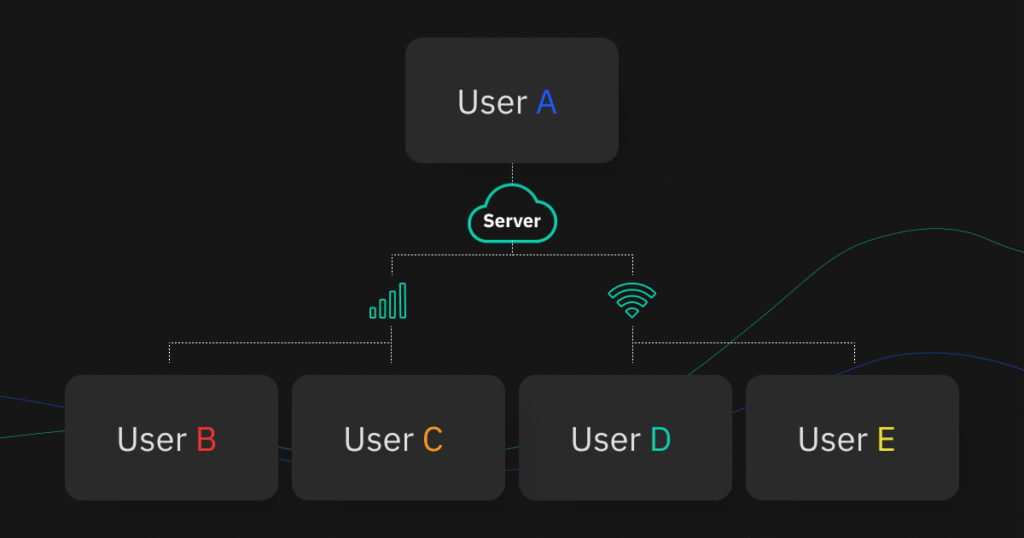
Push-to-Talk Over Cellular (PoC) combines the basic PTT concept and smartphone technology into a single device. With PoC, users can leverage the half-duplex communication mode for 2-way connectivity over 3G, 4G or WiFi networks to overcome the limited coverage issues presented by traditional PTT.
There are no additional infrastructure requirements, you can leverage the cellular network to offer global connectivity to your users. In fact, many businesses rely on established cellular internet providers to ensure consistent network access for their distributed teams. Push to Talk Over Cellular (PoC) solution replicates the functionality of two-way radios on the user’s smartphones with the help of an app. This method breaks the barriers to limited coverage and negates the need for the field workforce to carry multiple devices on-site.
Working of Push-to-Talk over cellular (PoC) Benefits of Push to Talk Over Cellular (PoC) In Comparison To Traditional PTT
Global Network Coverage
Unlike traditional PTT devices that restrict their user’s connectivity to a certain geographical area, Push-to-Talk Over Cellular (PoC) or PTT over cellular enables users to have seamless global connectivity. You can connect to an individual or make group PTT calls from anywhere in the world over any cellular network.
Reduced Capital Expenditure
Push to Talk Over Cellular (PoC) can be leveraged from any device, Android, iOS and even desktop using the latest PTT software. This negates the need for businesses to invest in special walkie-talkie devices. Modern-day PTT software can be easily integrated into employees’ personal devices as well, making instant connectivity economical even in BYOD environments.
Ability to Integrate Powerful Features
High-end PoC systems such as NuovoTeam have a variety of features integrated into a single solution such as file sharing, VoIP calling and real-time location sharing in addition to PTT capabilities that make it an ideal solution for the field workforce.
Ease of Administration
Traditional walkie-talkie devices are bulky and tedious to manage in large numbers. Push-to-Talk Over Cellular (PoC) systems can be easily managed using PTT software. As most businesses implement RMM tools or MDM solutions to manage their remote operations, the PTT software can be distributed over the air on multiple remote smartphones to leverage PoC functionality.
Benefits of Push To Talk Over Cellular (PoC) Over Other Modes of Communication
Push-Button Connectivity
PTT over cellular systems allow users to leverage instant remote connectivity at the mere push of a button. Users need not engage in lengthy processes involved in direct-dialed phone calls or typing detailed emails and text messages.
Easy to Use
Writing formal emails, operating business messaging tools and other communication modes such as video conferencing require the user to be moderately tech-savvy. PTT over cellular systems work on the PTT functionality which requires the user to simply press a button and talk, making it extremely user-friendly.
Barge Calls
PTT calls allow the field workforce to hear the incoming PTT message in an eyes-free and hands-free manner as and when received. These barge calls ensure that the field workers never miss the business-critical messages even when engaged in on-field activities.
Crisis Communications
The field workforce operates in labor-intensive and hazard-prone environments including mines, highways, construction sites, etc. In times of crisis, when there are lives on the line, field employees must have the means to obtain quick help. Push to Talk Over Cellular (PoC) enables the field employees to skip the dialing procedures and gain help at the press of a button.
NuovoTeam PTT software
NuovoTeam is a Push-to-Talk solution that offers several salient features to drive seamless communication for the field workforce. There are plenty of ptt over cellular devices available in the market. However, with NuovoTeam PTT software you can turn your commercial Android or iOS smartphones, or rugged devices into walkie-talkies.
Also read: Understanding Push-to-Talk: 10 Important Questions Answered
Why is NuovoTeam PTT software ideal for your business?
PTT Connectivity
NuovoTeam offers cross-platform interoperability and works seamlessly with Android and iOS smartphones, as well as any machine with a Chrome browser be it PCs, macOS or Linux machines using its Desktop PTT feature.
Instant Team Collaboration
NuovoTeam is a PTT software that comes integrated with several instant communication capabilities including text messaging, VoIP calls, file sharing, video messaging and location sharing.
Channel Management
You can create diverse open and closed channels for focussed conversations. NuovoTeam allows you to create Public and Limited Public channels with open channels allowing users to join and leave as per their will. You can also create Closed and SOS channels that do not permit the users to leave ensuring that critical messages are delivered efficiently. The SOS channels play a vital role in crisis management since it enables the field workers to share a 10-second PTT message followed by the location of the user.
DeepDive Analytics
Managers and supervisors can leverage a comprehensive overview of their remote employees and track their locations, attendance and working hours. This helps the line managers to track their on-field employees’ performances on the go.
Closing Lines
If you are in search of a solution that streamlines your field communications, then investing in Push to Talk Over Cellular solution is the right choice for your business. PTT software like NuovoTeam helps businesses combine the capabilities of PTT walkie-talkies with mobile phones to experience the best of both worlds.
-
Introducing Desktop Push to talk (PTT): Now Connect Your Office to Your Field Force With NuovoTeam
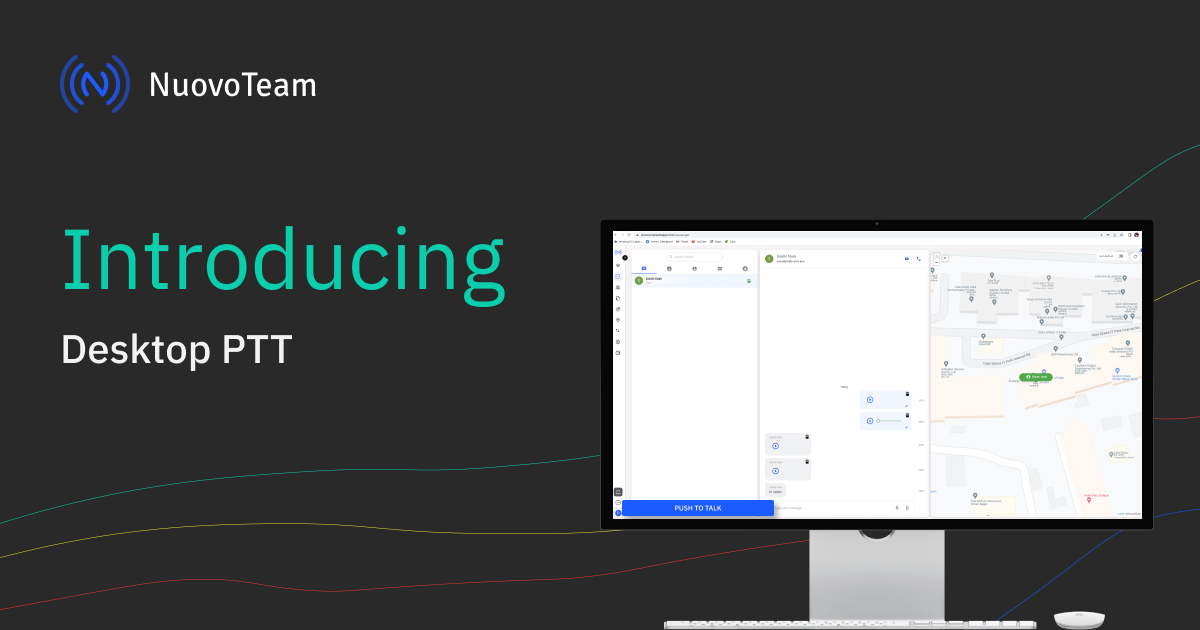
We are thrilled to announce that NuovoTeam now offers Desktop Push-to-talk (PTT) that is seamlessly integrated with the Chrome browser, negating the need to install desktop clients. Designed with the thought to enable the office workforce to connect effortlessly with their on-field colleagues, NuovoTeam’s Web-Based PTT allows instant communication between the office and the field helping them bridge the gap and stay connected.
NuovoTeam’s Desktop PTT: What’s Different?
Frontline employees are critical to your business’s productivity and reputation. The way supervisors communicate with their frontline employees marks the course of your operations. As most office environments are dominated by PCs and laptops, wouldn’t it be so much simpler if the office staff could make PTT calls from their PCs? The NuovoTeam’s Desktop PTT makes it possible.
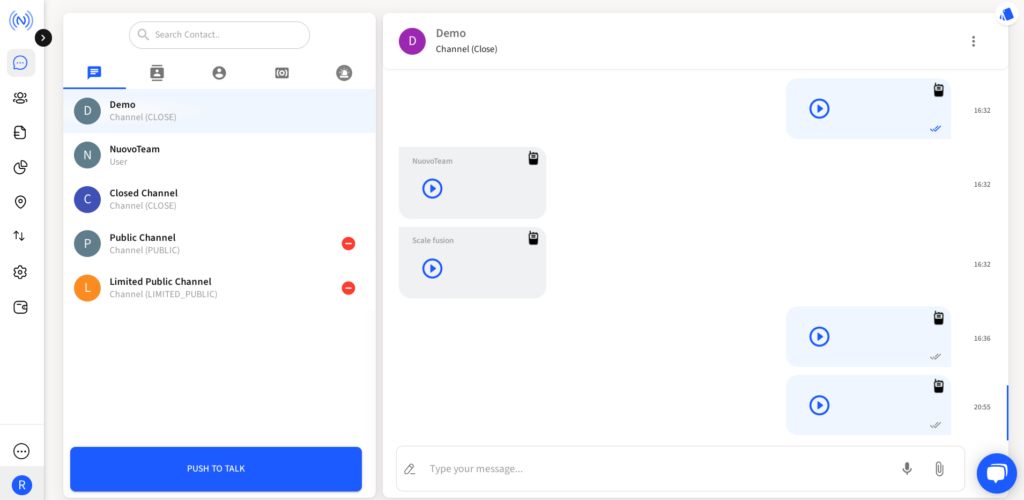
Line managers and supervisors need not make frequent switches from their PC to smartphones just to make a PTT call. They can leverage PTT directly from the NuovoTeam dashboard using any PC, macOS or Linux machine, all that is needed is a Chrome browser. Just sign in to the NuovoTeam dashboard, click on the PTT & Chats section and leverage instant PTT connectivity.
What does the NuovoTeam Desktop PTT Support?
- Closed Channel PTT: Users can leverage Desktop PTT across all closed and SOS channels.
- 1-1 PTT: You can conduct a 1-1 PTT call with any member of your organization regardless of the device type.
- Group PTT: You can create multiple channels based on your frontline employees’ locations, departments, etc. and execute group PTT calls from the dashboard.
- Live Voice Playback: The live voice playback allows you to play and replay the PTT messages to prevent business-critical information from being siloed.
Industry Applications of DesktopPTT
The ability of managers and supervisors to instantly connect with their frontline employees using the Desktop PTT plays a crucial role in several industrial sectors.
- Security Services: With NuovoTeam’s Desktop PTT, command centers can instantly get in touch with their frontline security personnel and relay rapid instructions.
- Logistics & Transportation: Fleet managers can easily get in touch with their drivers, as well as warehouse executives and delivery agents with Desktop PTT.
- Hospitality: Desktop PTT enables the hotel, restaurant, or airport management to easily get in touch with their housekeeping or ground crew.
- Healthcare: Hospital management can instantly summon ambulance drivers, nurses or even security guards in events of emergencies.
NuovoTeam’s Desktop PTT is a fine addition, tailored to save time and effort spent in streamlining remote connectivity. Why juggle between the devices when you can have it all on a single console. Experience it for yourself. Sign in to get started.
- Closed Channel PTT: Users can leverage Desktop PTT across all closed and SOS channels.
-
How Does NuovoTeam Push-to-Talk App Work?
Introduction
The workforce today is tech-driven, tech-savvy, and majorly remote. We all have witnessed the power of telecommuting in the recent past. It worked as a silver lining during crisis time. Employees choose to work remotely as it gives a better “work-life balance.”
But when it comes to on-field employees or non-desk workers- working from home has never been a choice. According to Buffer¹, the 3 major challenges related to remote work are loneliness, communication, and unplugging from work after work hours.
Let’s understand the Push-to-talk or PTT technology in brief.
PTT Devices, Technology, and PTT apps: An Overview
Conventional PTT devices or handheld Walkie-Talkie devices are robust and sturdy devices meant to be used in harsh and hostile environments such as natural disaster sites, construction sites, factories, oil and gas industries, mines, roads, etc. Onsite workers, first responders, and on-field workers use them to send two-way voice messages with just a press of a button. But these traditional devices work within a limited range. Also, they are bulky devices that are heavy to carry along, thus they are an added responsibility.
Push-to-Talk apps came as a breeze of fresh air to the secluded remote field force, that now can leave those bulky handheld devices at bay and can stay mobile, without losing touch with the entire team.
The nature of their very job demands the field force to be on the go, most of the time. Their challenges are unique and so should be the technology.
NuovoTeam PTT or push-to-talk app is such a technology that helps the on-field remote workforce to communicate, collaborate, and stay updated and engaged.
Let’s unfold the most trusted, reliable, and latest PTT app, NuovoTeam PTT app in detail.
NuovoTeam: The Best Push-to-Talk Mobile App
NuovoTeam is flawless, reliable, and the most trusted app available in the market today.
In fact, with its on-point features, it is worth saying that it’s one of the best mobile apps that offers an exceptional experience to on-field workers and their employers.
- NuovoTeam enables remote workforce to engage, communicate, and collaborate across teams.
- It is a software-based app with a push-to-talk feature that can benefit organizations and their on-field employees.
- It offers multi-device support across diverse networks.
- Its intuitive dashboard allows the IT admins to have a 3-dimensional view of the device fleet. This helps in managing and monitoring the devices effectively.
- It is cost-effective and user-friendly.
In short, it is a modern-day tool for smart enterprises. It is simple, reliable, and secure.
Industries NuovoTeam Caters to
Nuovoteam is the lifeline of many professionals, such as public safety professionals, construction site workers, police officers, paramedics, firefighters, delivery drivers, health care workers, etc.
Many industries that benefit from the NuovoTeam PTT app include:
- Retail
- Logistics
- Hospitality
- Manufacturing
- Transportation
- Health care
- Disaster management
- Oil and gas industries
- Cleaning and Homecare
- Constructions
Key benefits of NuovoTeam PTT apps
NuovoTeam is powered with the latest technologies that helps the workforce to enhance productivity and collaboration. Organizations across the globe use NuovoTeam which offers various benefits to employers and employees, both. Let’s take a quick look at some of the major benefits.
Push-to-talk feature and Instant Communications:
Instant communications are important to businesses worldwide. The flawless modern-day Push-to-talk app, NuovoTeam enables team members to connect instantly, across devices, irrespective of location.
It facilitates employees to talk or communicate with just a press of a button. Employees can collaborate in various groups and can send live alerts and broadcasts to the entire team at once.
Easy Document Sharing:
Through the NuovoTeam app, all kinds of documents and files can be attached and distributed company-wide, which makes the operations smooth.
Privacy Focused Location Tracking:
The push-to-talk apps or the PTT apps offer location tracking facilities that help the companies take care of and track their on-field force in real-time.
Monitored clock-ins and clock-outs:
Employers can keep track of their field force workers’ clock-in and clock-out time, which can help to increase employee productivity and at the same time, can help identify overburdened workers. This way, employers or supervisors can help their workers keep engaged and well-monitored too. They can also schedule and assign tasks through this app.
VoIP calling and encrypted multimedia messaging:
Field workers can leverage VoIP calling facility and encrypted text messaging.
Live Voice Playback:
Field workers can listen to voice messages live or later, as per their time and convenience.
Emergency SOS alert feature:
NuovoTeam offers an emergency SOS alert channel that can be created in three different ways i.e. organization level, team level, and custom channel. This allows the team members to alert the entire team in a fraction of seconds. This feature is unique and helps prevent accidents at bay! The participants present in that SOS channel can respond to the received SOS message.
How does the NuovoTeam app work?
Let’s discover the steps to create a new account, and then the steps to enroll, and get started with the dynamic dashboard of the NuovoTeam app.
To set up an account:
Step 1. Sign up for the NuovoTeam PTT by clicking here.
Step 2. Fill in your credentials. Your name, Your work email, password, and phone number (optional). Agree to the terms and policies.
Step 3. Click on Create Account.
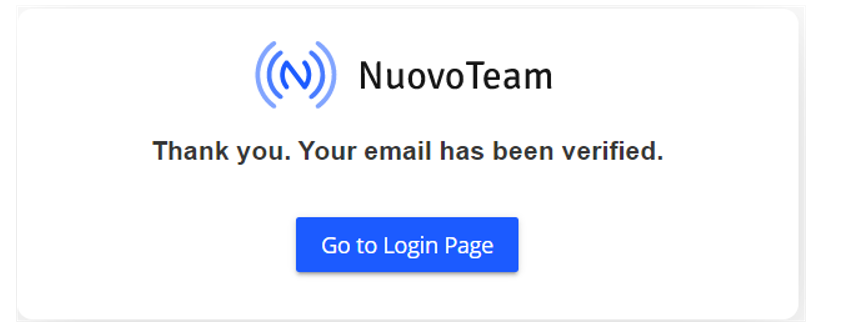
Step 4. A verification email will be sent to your registered email address. You can click on the link provided in the mail to verify your account. You will see this message:
Step 5: Choose what’s relevant to you. Select your industry, expected number of users, and how you would like to use Nuovoteam.
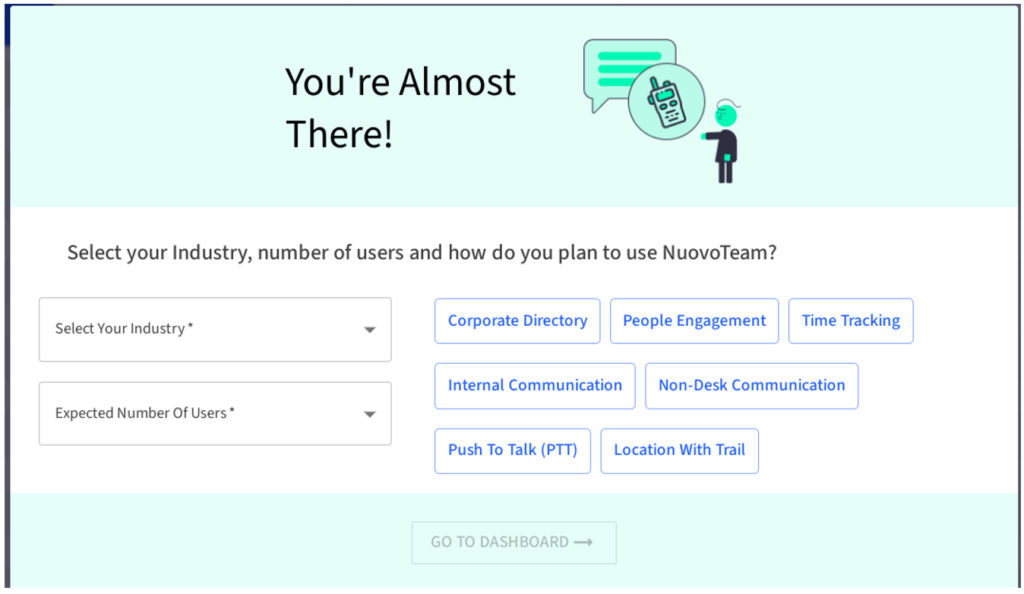
An option below allows you to go to the dashboard where you can leverage the settings.
After the account creation and registration, you will get to see the NuovoTeam dashboard.
Our user-friendly interface says it all! Have a look at the dashboard’s pretty face as you step in.
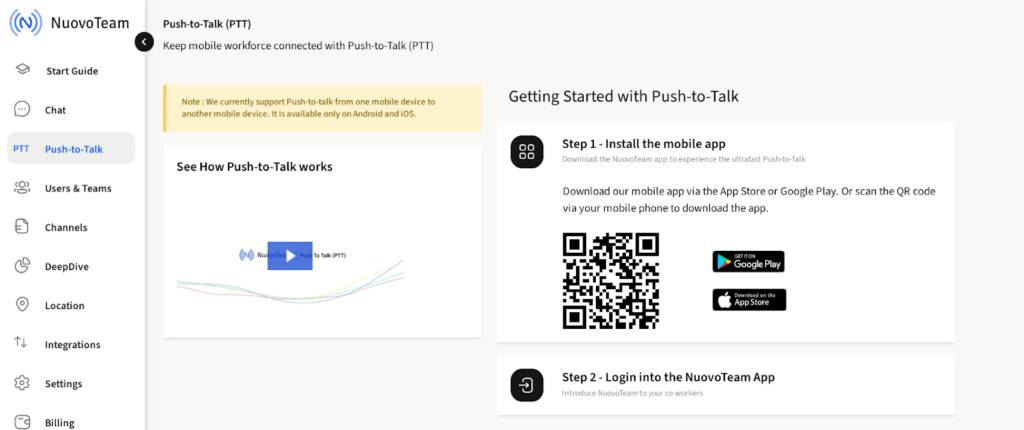
Our dashboard has an extremely helpful interface, with “Start Guide” and “Contact our Product Expert” features; so that you can always have the best experience by knowing what all we know as we developed the app.
Steps to install the NuovoTeam app and enroll your devices.
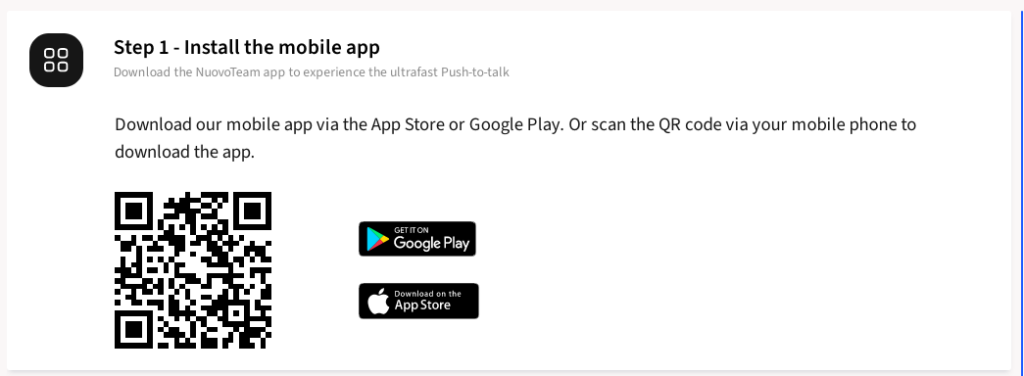
Step 1. Install the mobile app via the App Store or Google Play. You may also scan the QR code via your mobile to download the app easily.
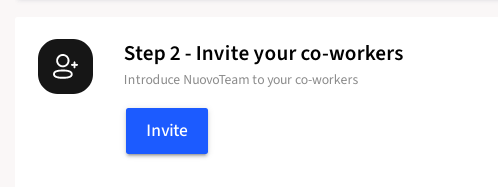
Step 2: Invite your employees or co-workers.
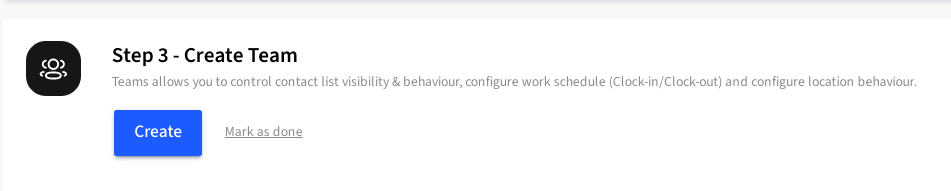
Step 3: Create a Team. Here, you can control contact list visibility, configure work schedules like Clock-ins and Clock-outs, and configure location settings.
Let’s get familiar with the dashboard.
The vertical panel on the left of the dashboard has tabs to explore and set various features based on your requirements and convenience. They are listed as follows. Start Guide, Chat, Push-To-Talk, users and teams, channels, DeepDive, location, integrations, settings, and billing. Please refer to the screenshot below.
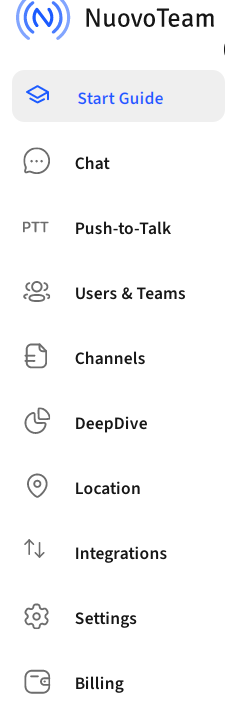
Let’s explore the features in the vertical panel one-by-one to understand NuovoTeam better.
- Start Guide
Start Guide enables you to enroll and set up your devices, invite users, etc. This is a very important option as, without this basic step, you cannot use the NuovoTeam app. Whenever you would want to use other features of the app, this window will pop up again and again, unless you enroll and invite users:
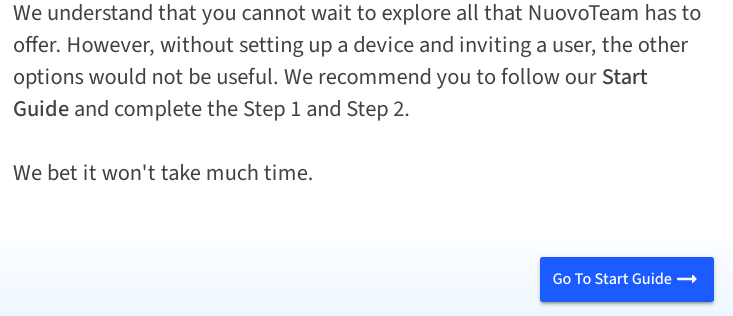
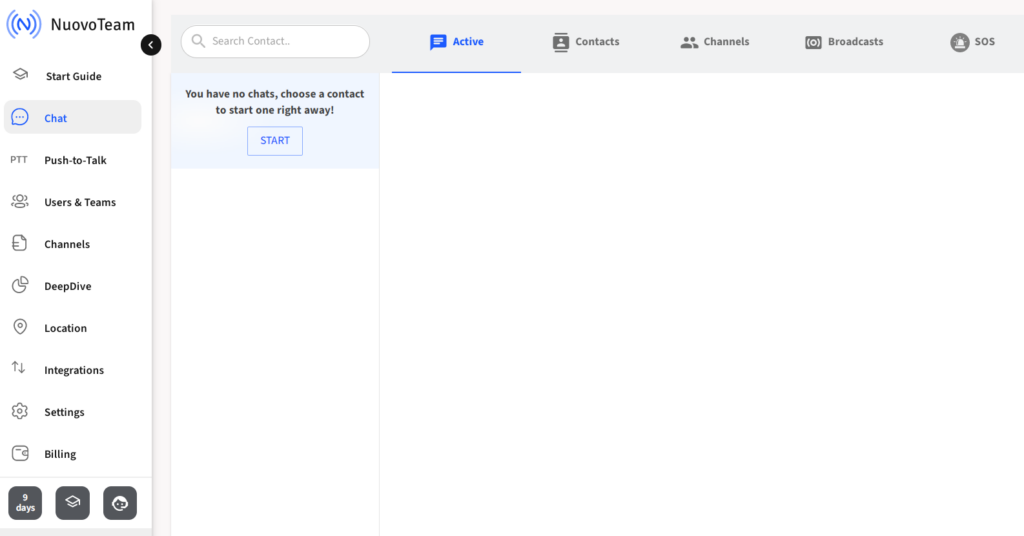
- Chat
After setting up your device, and user enrollment, you can try the chat option. It allows users to add users, view active chat, access company-wide contact details, create channels, and schedule live broadcasts for the entire team. Also, you can create SOS channels through this chat window.
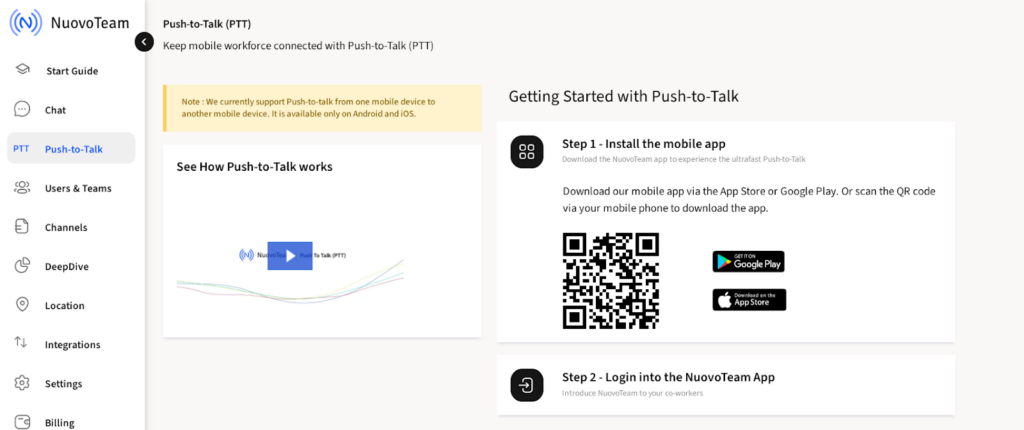
- Push-to-Talk
This option allows you to leverage the benefits of PTT, walkie talkie or Push-to-talk on your Android and iOS mobile phones. A small video clip shows how the Push-to-talk app works. Please see the screenshot below:
- Users and Teams
This option comprises the utilities to build your contact list and build teams. It encompasses Users, Teams, Newsfeed, and contact list.

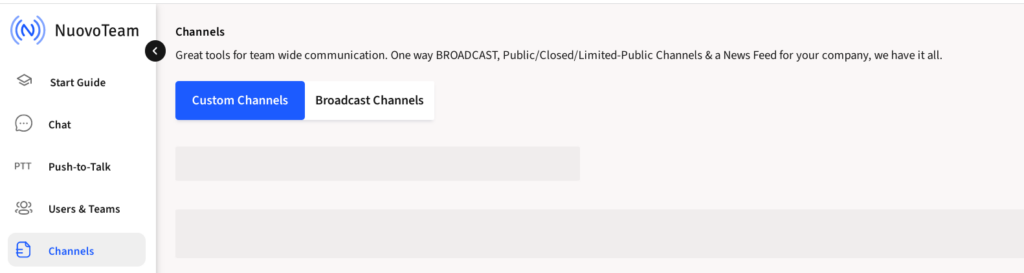
- Channels
Nuovoteam allows team-wide communication through various custom channels and mediums like one-way video interviews, News Feed for your company, public channels, etc.
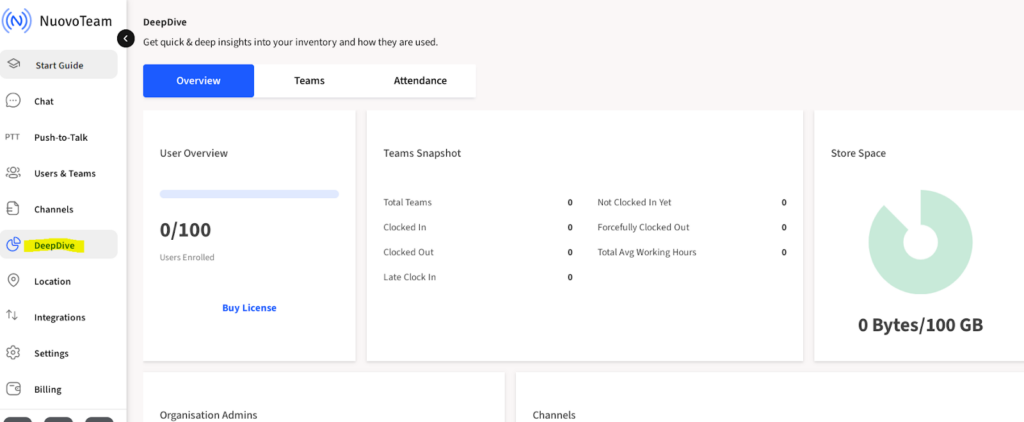
- DeepDive
Nuovoteam facilitates by providing quick and deep insights into your inventory. There are options to see how many users are enrolled, how many field workers have clocked in and clocked out, their total average working hours, late clock-ins, and many more such incidents, which help manage and monitor the workforce.
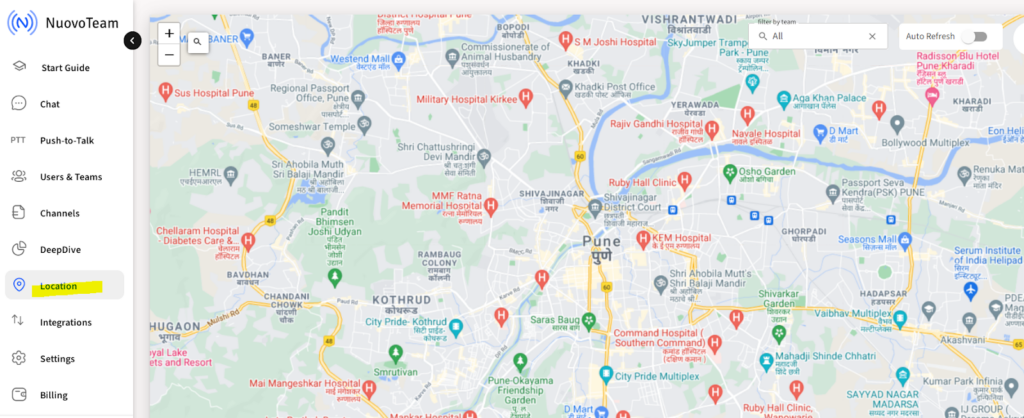
- Location
NuovoTeam helps Track, manage, and monitor device location in real-time. This helps in keeping your field-force in touch and on track, always.
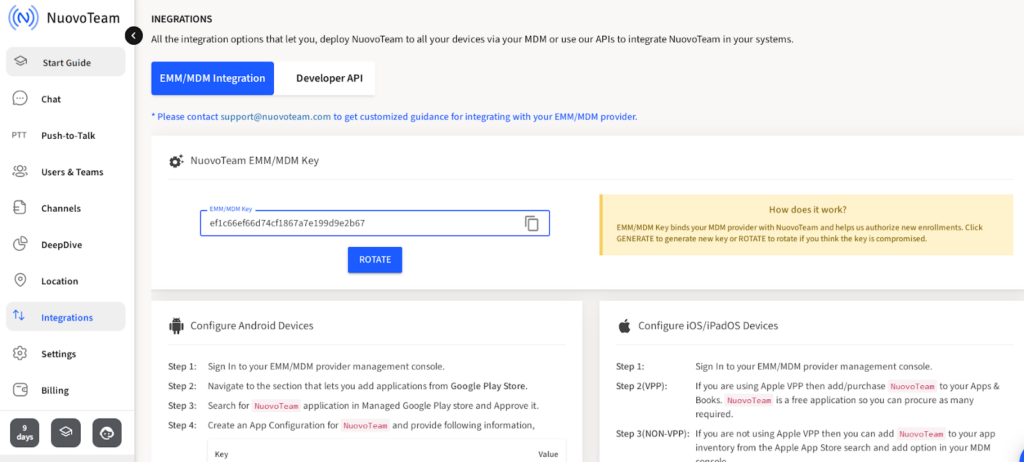
- Integrations
This feature comprises all the integration options that let you deploy NuovoTeam to all your devices via MDM, or use our APIs to integrate NuovoTeam in your systems.
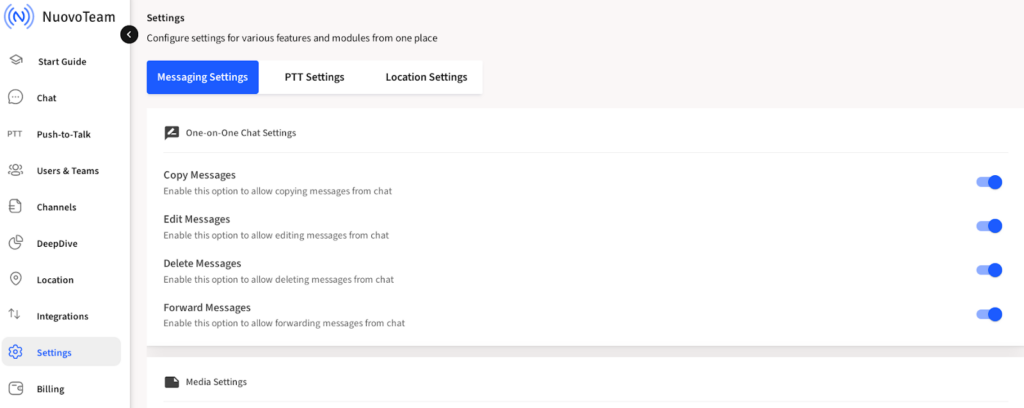
- Settings
This option is very useful as it helps configure settings for various features from a common place such as message settings, Push to Talk settings, location settings, etc.
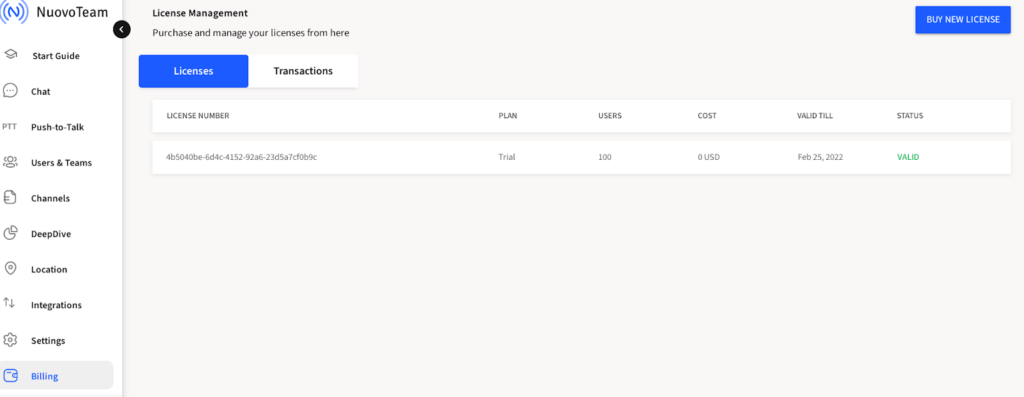
- Billing
This option allows you to purchase and manage licenses. You can see license number, plan, users, cost, validity, and status.
Below these, at the bottom left corner of the dashboard, there are three options.

Starting from the left, the first one shows the days remaining with the current plan purchased, start guide, and help, respectively.
Help and Support
Through our dashboard, you contact a product expert in case of any query.

For added clarity on the product, you can explore the help section also.
Closing lines
Nuovoteam, with its lightning-fast communication channels, keeps the mobile workforce connected with instant voice messaging, text, and multimedia messaging.
The on-field employees work for businesses day and night to ensure smoother operations. So, businesses need to provide such a deserving field force with reliable apps like NuovoTeam that support employee engagement, collaboration, satisfaction, and overall business success.
After all,
“Effective teamwork begins and ends with communication.”
-
What is a Push-to-Talk app?: A Fundamental Elaboration
Introduction
Communication is an art. When done right, it possesses the power to make the impossible possible. Businesses across the globe thrive on clear, crisp, and timely communications. Although there are certain factors that help businesses grow and prosper; an effective communication strategy is imperative, is irreplaceable, and can make any business stand apart from the rest.
This is the “remote era of work.” But what about team communications, then? Well, with time, the way teams and employees communicate has also been digitized. Certain software-based applications facilitate prompt team communications to ensure smooth operations, irrespective of geographical boundaries, team type, industry, and requirements.
The developers of certain apps fused the essential age-old technologies with advanced modern-day features, often complementing productivity platforms such as Vibe coding tools like Lovable and Replit, to help businesses operate in the best ways possible. In short, they applied the logic of having the best of both worlds!
Software-based professional PTT or Push to Talk apps are one of such modern-day team communication and collaboration apps, that work on the lines of walkie-talkie technology.
Frankly, the push-to-talk technology is not something new to the world but it can’t be tagged as old either. Its utility still stands relevant, especially in the contemporary corporate scenario. These PTT apps are the most trusted and most sought business communication and collaboration software applications as they cater to the industries where the fastest communications define the business credibility. The fact that they are user-friendly makes them a great choice for the remote and on-field workforce. Let’s explore in detail.
What is a push-to-talk app?
As the name suggests, Push-to-Talk or a PTT app or a walkie-talkie app is an instant mode of communication as it facilitates the team members to talk or communicate with the entire team by just pressing a button. Employees can communicate unlimitedly without having to worry about call charges. Also, with the latest PTT apps, the conversations are secure and encrypted. The team members can share confidential documents, files without worrying about security incidents, as these apps are monitored and tracked efficiently.
Generally, Push to Talk technology utilizes a handheld device with a Push-To-Talk button to send and receive instant voice messages. Professional Push-to-Talk apps work similarly, but with the added advantage of without having to carry any additional Push-to-Talk devices. The Push-To-Talk or PTT apps can be easily installed on mobile devices, can be managed, monitored, and secured over the air. These apps also have attractive yet immensely useful additional features like live broadcasts, group messages, emergency alert notifications or SOS alerts, VoIP and video calling, location tracking, etc.
We’ll talk more about the plethora of features a professional PTT app offers, in detail, but let’s explore the need and several applications of the PTT apps.
Need & applications of the PTT app
We have emails, newsletters, announcements, text messages, and many other modes of corporate communications. Even we have cellular phones and traditional walkie-talkie devices. Then, the question is – what is the need for a PTT app? Let’s understand a little more!
For the remote workforce operational today or for the frontline workers, communication stands as a major challenge as they operate in harsh environments, emergencies, noisy construction sites, etc. In addition to these, remote work challenges such as isolation, limited real-time collaboration, and security concerns also hinder effective team communication and coordination. Building an effective and instant communication strategy is often overlooked by organizations, especially when it comes to frontline workers, on-field workforce, and remote workforce. Though cellular phones come in handy, this fact cannot be ignored that the cellular networks do not behave the way they should, in the above-mentioned conditions.
Also, cellphones have a set standardized process to dial in a number, find a contact, wait for the other end to respond, or wait for being heard back. Sometimes your on-field employees might real-time chat over cellular networks and share confidential documents in absence of a professional business app dedicated to their corporate needs and discussions. But, that’s not a secure and consistent way. Sharing sensitive information this way paves the way to data breaches and security incidents, as your confidential corporate data and information gets discussed and shared over private cellular networks. This can intimidate your clientele too as their information also gets shared in an insecure way. Also, the risk of data loss is always there in absence of any consistent unified console.
Employers often think that their field force is active and at work, but in reality, in absence of real-time communication and collaboration systems, the remote and always on-the-go workforce feels isolated, ignored, and often unheard. This not only drags their productivity levels down, but a lack of real-time communication can damage the infrastructure in many possible ways. Sometimes, when not monitored or tracked, employees refrain from being proactive as they lose interest.
The general challenges faced by the on-field workforce are many but to list a few:
- The on-field workforce has to travel a lot and is always on-the-go
- Less communication among the team leads to confusions
- Work in a dynamic, sometimes harsh environment
- Frontline workers are generally involved in a lot of physical activity
- Chances of accidents and injuries are more when compared to the non-field workforce
- Employees feel isolated and unanswerable at times
- Absence of instant communication in times of emergency
A smart professional PTT app offers granular control over all these above-mentioned issues especially in certain industries where quick and crisp communications are crucial for survival. Let’s quickly walk through the industries where professional PTT apps are used.
- Healthcare
- Security
- First Responders
- Supply-Chain Management and Logistics
- Hospitality
- Event Planning Industry
- Construction sites & factories
- Cleaning and homecare
- Retail
Benefits of a Professional PTT App
The above-mentioned industry-wide challenges and utility paved the way to better on-field communication and collaboration apps. The benefits are many, but to list a few:
- Cost-effective
- Time-Savior
- Field-force friendly
- Encourage instant and secure communications
- Compatible across diverse operating systems such as Android, iOS, etc.
- Connects multiple workers at once
- Help avoid time-consuming emails and voice calls
- Execute quick alerts during emergencies
- Minimal training required
NuovoTeam PTT App
“If the challenge exists, so must the solution!”
The NuovoTeam app is crafted with care and intent and has the potential to take team communication to another level. NuovoTeam Push-to-Talk app is an all-in-one secure business messaging and collaboration software that helps non-desk workers stay connected, aware, and in touch. It not only helps sort out all the communication-related issues which the on-field workers face, but it has benefits for IT admins as well.
Let’s quickly tour through what NuovoTeam has to offer!
Unified Dashboard
NuovoTeam’s unified dashboard helps the IT admins have a bird’s eye view of their devices as they can easily manage the devices from a single dashboard.
Smart Device Compatibility
NuovoTeam communication and collaboration software is compatible with Android, iOS, rugged, and custom PTT devices over any network connection. So, your on-the-move team doesn’t need to carry those bulky handheld devices just to leverage the walkie-talkie feature.
Secure and encrypted multimedia messaging
Employees can securely share encrypted text and video messages across teams and departments through the app. By using an AI video maker, businesses can also create engaging internal video content that improves communication, collaboration, and team engagement. The encryption not only ensures data security but also supports lead generation by protecting sensitive client information and fostering trusted communication.
Real-Time Location Tracking
You can now track and monitor the location of your device fleets in real-time. This comes as a relief to your organization’s digital assets.
Clock-ins and Clock-outs
NuovoTeam helps to know the clock-in and clock-out time of your non-desk workers. This helps to understand their work patterns, and productivity better. This is helpful for the on-field workers also as it saves them from overwork.
SOS Channel and Newsfeed
NuovoTeam has a special SOS channel feature so that your employees can alert each other in panic situations.
Closing lines
Organizations today need quick yet extensive and tailor-made solutions to face almost any challenge that comes their way including managing remote teams, non-desk compliance, overall employee engagement, security, and integrity.
NuovoTeam PTT app is crafted keeping modern-day businesses in mind. It is considered the most trusted, reliable, user-friendly, safe, and secure business communication and collaboration app. Each of its features is unique, robust, and has an excellent support team as its backbone.
To attain maximum productivity of the non-desk workers and streamline business communications across remote teams, Push-To-Talk apps are the best choice. A safe, secure, and reliable business communication and collaboration app like the Push-to-Talk app can help reduce the challenges faced by the on-field workforce as they feel connected, answerable, and in touch.
-
How NuovoTeam PTT App Helps Non-desk Workers?
Introduction
The field force plays a vital role in establishing and maintaining a company’s brand reputation and value because they meet and interact with the customers directly. In short, they are the real face of the company they work for. Therefore, It is very important for the businesses to not only manage and monitor the on-field employees but it is also very important to keep them well-collaborated, satisfied, and in sync.
Since the on-field workers are always on-the-go, traveling, or working in harsh environments like construction sites, factories, natural disaster sites, etc, the major challenge that they face is communication and collaboration with their team members. NuovoTeam, a modern-day PTT app, not only helps solve these challenges but also provides additional benefits to the non-desk workers across various industries.
First, let’s take a look at some of the challenges the on-field workforce grapples with, in their day-to-today operations.
Challenges of the on-field workers
In this world of globalization, staying connected is not as easy as it looks. The on-field workers come across unforeseen circumstances like poor network, connectivity, rains, storms, on-site accidents. Such challenges require robust devices, tools, and technologies to keep the business running, even during extreme situations. Let’s explore.
Road Travel
The nature of the job of the on-field workers requires extensive traveling. They are always on the move, driving, and traveling for official purposes. With so much travel involved, their lives are full of uncertainties and challenges, which otherwise the in-office employee would not face. For example, their chances of accidents and injuries are more when compared to the non-field workforce.
Overworked field force
Sometimes, even the supervisors working in the office do not know the real situations these on-field workers have to face. This results in chalking out an unrealistic work schedule for the on-field employees, and tired employees are less likely to work effectively. In road situations, like driving, this can be potentially dangerous. This can be fatal, too, in some extreme cases.
Communication-the major issue
All the challenges bud from the fundamental issue-lack of or less or ineffective communication among the team. On-field employees are physically distant from their managers, supervisors, and other desk workers. The conventional ways and modern ways of communication like paperwork, emails, text, and calls are amalgamated in such a manner, which creates confusion for on-field employees.
Work in a dynamic environment
The on-field workforce operates in dynamic conditions as they have to cater to diverse business requests like delivery, shipping, pick up, etc. In absence of real-time communication and real-time management, sometimes they lose direction and zeal to work as their issues and queries are not solved in real-time. Also, such a dynamic setup poses security and safety concerns for the on-field workers.
Hampered Wellbeing
The absence of instant communication or inability to alert their team members quickly in times of emergency is one of the biggest roadblocks that come in the way of on-field employees. For example, in case of a dispute with one of the customers, while attempting to deliver goods, the on-field employee will try to connect with the team to resolve the issue. In absence of a cellular network, or poor network-they become helpless. They feel isolated and unsafe. This creates a major impact on their physical and mental well-being.
Great challenges call for great solutions!
On-the-job challenges paved the way for better on-field communication and collaboration software, equipped with the latest push-to-talk technology and team communication features, NuovoTeam Push-to-talk app.
Let’s explore NuovoTeam in detail, industries that it benefits, and how it helps the non-desk workers.
What is the NuovoTeam PTT app?
Earlier, the on-field workforce communicated with each other via walkie-talkie devices by sending and receiving voice commands on a two-way radiofrequency. Those were useful, but worked within a limited range and were heavy to carry. This gave rise to the need for Push-to-Talk apps, which are comparatively easy to use, work on wi-fi and cellular networks, are not restricted to any specific range, and are compatible with modern OS platforms.
The business world requires razor-sharp tools and technologies, applications, and software.
NuovoTeam is one such latest and most trusted business messaging, communication, and collaboration app. The app replicates the experience of traditional walkie-talkie devices. It helps the on-field workers communicate and collaborate easily and effectively.
NuovoTeam’s compatibility with Android phones, iPhones, and customized rugged devices makes it an excellent choice for on-field workers.
Let’s take a quick look at the industries where the NuovoTeam app can be used by the on-field workforce to reap maximum benefits.
Diverse Industries NuovoTeam Caters To
The on-field workforce acts as the lifeline of certain industries; and NuovoTeam with its useful features, is tirelessly helping the following industries:
- Logistics and transport
- Shipping
- Healthcare
- Hospitality
- First Responders
- Manufacturing
- Constructions
- Retail
- Cleaning and Homecare
- Security
How does the NuovoTeam PTT app Help Non-Desk Workers?
NuovoTeam is a secure and reliable Push to Talk app that offers a plethora of benefits to the team manager as well as on-field workers. It enables the entire team to connect instantly by sending quick voice messages in real-time. Beyond this, NuovoTeam helps the on-field workforce in several ways. Let’s discover!
Push-to-Talk Feature
Instant communications are vital to businesses worldwide. The flawless modern-day Push-to-talk app, NuovoTeam facilitates business-wide communications by allowing the team members to connect instantly by just pressing a button and speaking. The mobile workforce feels connected and helped, especially in emergencies. They can send voice messages to the entire team and get heard in real-time. They also, in this way, get to know their team members and their challenges better.
Diverse OS and Device Compatibility
NuovoTeam is compatible with diverse OS platforms, device types, and networks. Be it Android Phones or iPhones, rugged devices, or custom-built devices, the NuovoTeam app supports almost any kind of device and technology built for business. This makes the NuovoTeam app an excellent choice for the on-field workers. It liberates them from the need to carry an extra heavy handheld device for the PTT feature alone.
File Sharing
All types of files and documents in different formats can be attached and shared with the team members of the entire company to make the operations smooth and transparent.
Location Tracking
NuovoTeam’s accurate location settings assist field employees stay on track and save time that would otherwise be wasted traveling. There are options to choose location accuracy mode, and tracking mode so that the real-time location can be fetched. These location sync settings help the managers keep a track of the on-field workers and this helps in distributing work in a balanced way.
Monitored Clock-Ins and Clock-Outs
This feature helps the managers to keep track of their field force workers’ clock-in and clock-out time, which helps to increase employee productivity and also helps to identify overburdened workers.
VoIP Calling and Encrypted Multimedia Messaging:
NuovoTeam allows the on-field employees to talk to each other over VoIP calls and thus saves those extracellular costs. It also allows encrypted text and multimedia messaging, which helps the workers to keep in touch, go paperless, and be more productive and efficient.
SOS Feature
With NuovoTeam’s SOS alert feature, on-field workers can record and send a 10-second audio message. It is circulated as an emergency alert along with a Live location to all the users of the SOS channel.
This feature is unique and helps prevent accidents at bay!
Closing Lines
“Technology is best when it brings people together.”
NuovoTeam PTT app does exactly the same-it brings the remote workforce together. It fosters a strong and effective communication strategy to keep the on-field workforce connected, informed, and engaged. Besides, its user-friendly features make it undoubtedly the best app for on-field employees, considering the challenging environments they work in.
-
Can a smartphone be used as a Walkie Talkie?
Introduction
The workforce today heavily relies on smartphones for their day-to-day tasks and communications. Living in an era of remote work is not super easy. This era requires cutting-edge technologies that can be utilized by almost all the resources working from the office as well as working remotely like frontline workers, first responders, or on-field resources.
But you know what!? Sometimes, cutting-edge technology has roots from the past. It is indeed very true when we talk about walkie-talkie devices or walkie-talkie technology that is still used extensively by the majority of the field-workers. But as the technology is old, our industry enthusiasts have left no stones unturned to make it relevant for today’s modern world business requirements.
As the businesses go remote, industry leaders sought modern ways to manage, monitor, and secure their remote device fleet. A technology like “walkie-talkie,” is now available to the modern remote workforce as Walkie-Talkie or Push-to-talk Apps. These apps can be easily deployed on smartphones and are compatible across diverse OS platforms. But is it worth it to use this technology when we already have feature-rich smartphones? Or let’s hop to the question, Can a smartphone be used as a Walkie-Talkie? Let’s unfold the pages of history about walkie-talkie.
History of Walkie Talkie
Long before, when the world was hit by a war (World War 2) and when mobile phones were not in existence, limited range Walkie-Talkie devices came into existence. Then, the walkie-talkie devices were based on radio signals and were used majorly for military purposes during wars to send alerts to soldiers and army officials. It helped them connect and collaborate. Then, came the evolved version of heavy backpack walkie-talkie transceivers, the handheld walkie-talkie devices that revolutionized the field of radio communication. The technology was simple, push a button to send a quick voice message for the other end to receive and respond back. They were, in technology, no way near to the modern-day smartphones; but were still relevant and useful.
Let’s take a look at the challenges with traditional walkie-talkie devices.
Challenges with Traditional Walkie-Talkie Devices
The frontline workers or non-desk workers are the resources who are always on the go. They are either traveling, working on construction sites, factories, mines, and harsh and sometimes hostile environments. Walkie Talkie devices are bulky and are not so easy to carry along. The workers who use walkie-talkie are bound to carry heavy handheld rugged walkie-talkie devices, which becomes an added responsibility. Also, these walkie talkie devices work within a limited range. Beyond that, they are of no use. They are non-trackable and if stolen or lost; it is another tough task to retrieve the devices back. But it is also a fact that some things never become old, it’s just that their face changes. The same goes with walkie-talkie devices too. Traditional walkie-talkie technology, paired with modern-day smartphones in the form of an application, have helped businesses across the globe overcome the challenges, with ease.
Come let’s hover through the smartphones.
Smartphones: An Overview
Can anyone or any business survive without smartphones? Guess, not! They are really smart and sophisticated. People of almost all age groups today know exactly how they work, and how they can be used for personal entertainment and infotainment purposes. Beyond communication, the same shift toward simple, app-based tools is happening on the office side too, with business teams increasingly turning to some of the best vibe coding tools for business teams to build internal apps without needing a developer. But they come with a certain set of challenges when it comes to quick communications.
Calling or texting through smartphones can be lengthy and complex. In order to talk to someone, the user has to call and wait for the other end to respond back. Sometimes, the other user may or may not respond back in real-time. In an emergency, such lengthy calling-methods can cost a lot. Also, conventional methods of typing messages to text are apparently more time consuming than walkie-talkie methods.
Waiting for the other end to respond back, even for a minute or two, can lead to hindrances in what could have been done in fractions of seconds.
For businesses, generally, it is difficult to track the productivity of remote workers, on-field workers, or frontline workers by just contacting them over the phone. The weakest point with remote workers is they are generally surrounded by distractions, isolation, dissatisfaction, and challenges. In that scenario, the businesses have no other option than to suffer!
So, let’s jump to the solution.
The Solution-The Push-to-Talk app or PTT app or Walkie-Talkie app
Yes, a smartphone can be used as a Walkie Talkie!!
Walkie-Talkie is an age-old but essential technology invented years ago, and its utility is still relevant. But the devices that were meant to be used as walkie-talkies had limited functionality and businesses including the remote workforce today, hate limits when it comes to functionality and operations.
So, here’s the solution that modern-day businesses rely on. A systematic, feature-rich, trackable, and user-friendly app-NuovoTeam Push-to-Talk or PTT app. NuovoTeam app can be easily installed on your Android or iOS smartphones, and come with advanced features.
Smart PTT apps like NuovoTeam not only help manage and monitor the field force but also provide improved employee engagement and collaboration, better productivity while at work through company-wide faster communications. In short, these apps have modified the whole canvas of the walkie-talkie communication experience, and have improved the overall health of the organizations and their field force. These apps can be installed on office-owned digital devices, can be easily tracked, managed, and monitored.
Beneficial Features of NuovoTeam
NuovoTeam is the most reliable, and modern-day software-based latest Push-to-talk app which not only replicates the Walkie-Talkie experience; but also provides exceptional features and benefits like:
- Unified console
- Diverse OS & device compatibility
- SOS alert in case of panic situations
- Document Sharing
- Encrypted Multimedia messaging
- Clock-in and Clock-Out monitoring
- Corporate Directory Access
- Location Tracking
- Adequate Employee Engagement
- Cost-effective
- Secure Communication
- Team Collaboration
- User-friendly
- Easy Deployment OTA
These apps not only ensure that the workforce outside offices is productive, but they also ensure the workforce outside the office has better job-satisfaction level and are not overworked. So it’s a win-win at both ends!
Closing lines…
Smartphones combined with capable Push-to-Talk apps like NuovoTeam can bring a sigh of relief to your business as a whole as they help to manage, monitor, and keep track of your field force.
With such great features, NuovoTeam is undoubtedly one of the best Push-to-talk apps in the global market today. This app allows swift and secure remote workforce communications, and provides an invisible boundary of protection to your workforce that’s traveling, on-site, and away from the office.
Certainly, with such powerful Push-to-talk apps, as a team and as a business; there is no looking back.